
The Transform Type-In Dialog
This dialog is activated by clicking on the Transform item in The Tools Menu.
It allows you to translate (rotate, scale and move) and object by entering exact translation values, instead of translating the object by mouse.
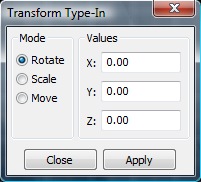
Mode
The transformation mode is set here:
- Rotate
Object is rotated by the transformation values.
- Scale
Object is scaled by the transformation values.
- Move
Object is moved by the transformation values.
Values
- X
Transformation in x direction.
- Y
Transformation in y direction.
- Z
Transformation in z direction.