
Animations
For many models, animations are the most noticeable and most important feature: Animation sequences define how a model moves, behaves or transforms over a period of time.
Animation sequences, like the model itself, are typically created by the model artist before the model is imported into the Model Editor.
The animations list
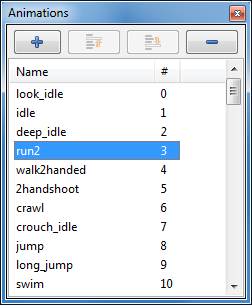 The Animations pane lists all animation sequences in the
model.
The Animations pane lists all animation sequences in the
model.
For each animation sequence,
its name and
the sequence number
is shown.
A single click on an animation sequence selects it, a double click opens the Animation Inspector pane as well.
Pressing the F2 key or a single-click on an already selected animation sequence allows you to rename the sequence in place.
.md5anim file) and adds it to the list. The “-” button
deletes the currently selected animation sequences.Context menu
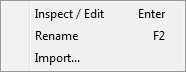 An RMB click in the Animations pane opens the context menu:
- Inspect/Edit
opens the Animation Inspector pane.
- Rename
allows to rename the animation sequence.
- Import…
, like the “+” button, imports a new animation sequence (e.g. from a
.md5animfile) and adds it to the list.
The animation inspector
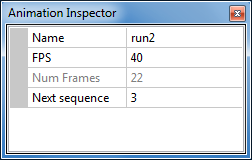 The Animation Inspector pane shows the details of the
currently selected animation sequence.
The Animation Inspector pane shows the details of the
currently selected animation sequence.
Name
Shows the name of the currently selected animation sequence. The name can be edited in order to rename the sequence.
FPS
The speed in frames-per-second with which this animation sequence is played.
It’s normally set by the model artists and needs only be changed e.g. for special effects such as slow motion, or if the right number was not correctly imported from the original model file, etc.
Num Frames
The number of key frames that the sequence consists of. The key frames are created by the model artist and cannot be changed here.
Next sequence
This is the number of the animation sequence to play after the current sequence.
This value is set to -1 to indicate “no” next sequence, which is used for animations that should just stop when they’ve reached their last frame. For example, a sequence of a player model for dropping to the ground after it was mortally wounded typically has a next sequence value of -1, indicating that this is a “non-looping” sequence.
Setting the value to the same number as the number of this sequence means “play this sequence again when its end has been reached”. It’s another way of saying that this is a looping sequence, such as walking or running.
Setting the value to a number other than -1 (“non-looping”) or the own sequence number (“looping”) can be useful to indicate logically consecutive sequences. For example, if a player model has a sequence for holstering its weapon, the “next sequence” value might be the number of an idle sequence – whatever the player does after he has the hands free.